Monday, November 20, 2017

VRguy podcast: Dr. Daniel Laby discusses Sports and Performance Vision


My guest today is Dr. Daniel Laby, of Sports Vision. Dr Laby began his work in sports vision more than two decades ago with the MLB’s Los Angeles Dodgers. He has also been responsible for the visual performance of the New York Mets and St Louis Cardinals, and currently works with the Boston Red Sox, Cleveland Indians, Houston Astros, Tampa Bay Rays and Chicago Cubs. Dr. Laby spent three seasons working with the NBA’s Boston Celtics as well as the NHL’s Los Angeles Kings. He also worked with the US Olympic team prior to the Beijing Olympic Games in 2008 and attended the games with the team.

Dr Laby has been fortunate to have contributed to an MLB American League Championship team as well as 4 World Series Championship teams.

Listen in here or subscribe on iTunes.

Saturday, November 11, 2017

VRGuy podcast episode: Thomas Wagner on VR Roller Coasters

Thomas Wagner is the CEO of VR Coaster. VR Coaster’s technology helps park operators convert traditional roller coasters into VR Coasters. Thomas and I discuss lessons learned from dozens of VR rides installed around the world.

Tuesday, September 26, 2017

VR's Dirty Secret


I traveled a lot in the past few weeks. All the hotels I stayed in had something in common: they had clean towels and fresh bed sheets.

But what if they didn’t? If the towels were dirty or the sheets looked like they were slept in, I would had complained.

But what if the hotel said: you are right: these are the old sheets, but we vacuumed the bed; these are the towels that the previous guest used, but we sprayed some Fabreze on them. Would I be happy? Of course not.

How about VR? Using a VR headset in an arcade after a stranger sweated in it for 30 minutes does not sound so appealing either. I’m not particularly interested in sampling the sweat, makeup, lice or whatever else the previous user had.

Hygiene in VR, and particularly in public installations, is an important issue that needs to be addressed. To me, that is VR’s dirty secret.

Tuesday, September 12, 2017

Mozart meets Virtual Reality

I'm a VR professional. I'm also an amateur violinist. Not too shabby, and getting better with practice.
Once a year, I take a week off to play with the wonderful musicians of the Baltimore Symphony Orchestra. Alongside the pros and other amateurs, we practice and perform great classical music works.

That week got me thinking about VR can help various aspects of the performing arts.
One key area is audience engagement. The performance feels much different on stage than off it. VR can put the audience in places that money can't buy. Just in front of the conductor. In the middle of the violin section. At the back of the stage where the percussion players are. The audience can experience the excitement of music making from within.

Indeed, several major orchestras are already experimenting with VR. The Los Angeles Philharmonic recording Beethoven's Fifth Symphony in 360-degrees. That recording is free to download.  The Philharmonia Orchestra of London has made similar recordings.  The Baltimore Symphony Orchestra shared an open rehearsal.

Critics are applauding this inside view into the music. Audiences are getting a unique immersive experience. Most major orchestras as struggling with balancing their budgets. Engaging young audiences with a VR experience can sell tickets and attract new followers. One day, one could imagine a completely virtual experience. A music lover in Iowa could attend a Berlin Philharmonic concert without international travel.

After all, Movies evolved from just filming a stage play to many cameras with movement. Why should attending a concert stay the same for hundreds of years?

Another area where VR can be useful is performance anxiety. Musicians get nervous in performances, just like some grade school students. If a musician cannot perform on stage at the same level that she performed in a rehearsal, that is a problem.

There are many techniques to battle performance anxiety. Books such as "The inner game of tennis" help overcome self-doubt and nervousness. Presenters like Noa Kageyama of "The Bulletproof Musician" teach other methods. Some musicians medicate themselves before a high-stakes performance. Virtual reality is already used today to help overcome fear of public speaking. It is easy to envision extending this to performance anxiety. Just like VR can place you on stage in a large conference, it can place you on the virtual Carnegie Hall stage.

One critical performer that gets the least practice time is the orchestra's conductor. This is particularly true for young conductors. Without a permanent position with an orchestra, "podium time" is scarce. Conductors end up conducting their CD players or TV sets in preparation for a real orchestra. Imagine using a VR headset with a hand gesture sensor for conducting practice. It could be the next best alternative to the real experience.

This might not be the most popular use of VR, but certainly one that I can't wait to try myself.

Wednesday, September 6, 2017

VRguy podcast episode: Kevin Williams discussing trends in out-of-home VR

Kevin Williams of KWP consulting and I spoke about out-of-home VR, including:

  • Longevity of VR cafe model
  • Single-experience vs configurable-experience sites
  • How much money would people pay for VR experience
  • and more

you can also compare this to what he said in late 2015

Monday, August 28, 2017

VRguy Podcast Episode: Jason Jerald, Principal Consultant at NextGen Interactions

Jason and I talk about VR sickness, precision input, and design tradeoffs in VR interactions. We have a particularly interesting discussion about pen input in VR

Listen to the Podcast or read the transcript at this link 

Friday, August 25, 2017

Four myths are blocking real, needed VR standards


Neil Trevett, VP Developer Ecosystem at NVIDIA and President of the Khronos Group collaborated with me on a VentureBeat article discussing the four myths blocking real, needed VR standards.

The four myths we discuss are:
  1. It’s too early for standards.
  2. Standards stifle innovation.
  3. Consumers won’t be impacted if standards are not enacted.
  4. There are too many cooks developing standards.
You can read the full article here.

Monday, August 21, 2017

Sunday, June 11, 2017

How does eye tracking work?

Eye tracking could become a standard peripheral in VR/AR headsets. Tracking gaze direction can deliver many benefits. Foveated rendering, for instance, optimizes GPU resources by using eye tracking data. Higher-resolution images at shown at the central vision area and lower-resolution outside it. Understanding gaze direction can lead to more natural interaction. Additionally, People with certain disabilities can use their eyes instead of their hands. Eye tracking can detect concussions in athletes and can even help people see better. Eye tracking can help advertisers understand what interests customers.

Eye tracking is complex. Scientists and vendors have spent many year perfecting algorithms and techniques.

But how does it work? Let's look at a high-level overview.

Most eye tracking systems use a camera pointing at the eye and infrared (IR) light. IR illuminates the eye and a camera sensitive to IR analyzes the reflections. The wavelength of the light is often 850 nanometers. It is just outside the visible spectrum of 390 to 700 nanometers. The eye can't detect the illumination but the camera can.

We see the world when our retinal detects light entering through the pupil. IR light also enters the eye through this pupil. Outside the pupil area, light does not enter the eye. Instead, it reflects back towards the camera. Thus, the camera sees the pupil as a dark area - no reflection - whereas the rest of the eye is brighter. This is "dark pupil eye tracking". If the IR light source is near the optical axis, it can reflect from the back of the eye. In this case, the pupil appears bright. This is "bright pupil eye tracking". It is like the "red eye" effect when using flash photography. Whether we use dark or bright pupil, the key point is that the pupil looks different than the rest of the eye.

The image captured by the camera is then processed to determine the location of the pupil. This allows estimating the direction of gaze from the observed eye. Processing is sometimes done on a PC, phone or other connected processor. Other vendors developed special-purpose chips that offload the processing from the main CPU. If eye tracking cameras observe both eyes, one can combine the gaze readings from both eyes. This allows estimating of the fixation point of the user in real or virtual 3D space.

There are other eye tracking approaches that are less popular. For instance, some have tried to detect movements of the eye muscles. This method provides high-speed data but is less accurate than camera-based tracking.

How often should we calculate the gaze direction? The eyes have several types of movements. Saccadic movements are fast and happen when we need to shift gaze from one area to another. Vergence shifts are small movements the help in depth perception. They aim to get the image of an object to appear on corresponding spots on both retinas. Smooth pursuit is how we move when we track a moving object. To track saccadic movements, one needs to track the eye hundreds of time per second. But, saccadic movements do not provide gaze direction. Thus, they are interesting to research applications but not to mass-market eye tracking. Vergence and smooth pursuit movements are slower. Tens of samples per second are often enough. Since Many VR applications want to have the freshest data, there is a trend to track the eyes at the VR frame rate.

Eye tracking systems need to compensate for movements of the camera relative to the eye. For instance, a head-mounted display can slide and shift relative to the eyes. One popular technique is to use reflections of the light source from the cornea. These reflections are called Purkinje reflections. They change little during eye rotation and can serve as an anchor for the algorithm. Other algorithms try to identify the corners of the eye as an anchor point.

There are other variables that an algorithm needs to compensate for. The eye is not a perfect sphere. Some people have bulging eyes and others have inset eyes. The location of the eye relative to the camera is not constant between users. These and other variables are often addressed during a calibration procedure. Simple calibration presents a cross on the screen at a known location and asks the user to fixate on it. By repeating this for a few locations, the algorithm calibrates the tracker to a user.

Beyond the algorithm, the optical system of the tracker presents extra challenges. It aims to be lightweight. It tries to avoid needs constraints on the optics used to present the actual VR/AR image to the user. It needs to work with a wide range of facial structures. For a discussion on optical configurations for eye tracking, please see here.

Eye trackers used to be expensive. This was not the result of expensive components, but rather of a limited market. When only researchers bought eye trackers, companies charged more to cover their R&D expenses. As eye trackers move into mainstream, eye trackers will become inexpensive.

Monday, May 22, 2017

Understanding Relative Illumination

Relative illumination in the context of optical design is the phenomena of image roll-off (e.g. reduction) towards the edge of an eyepiece. This manifests in an image that is brighter at the center of eyepiece relative to the edge of the eyepiece.

Relative illumination is usually shown in a graph such as the one below

This particular graph is from an eyepiece with 60-degree horizontal field of view designed by Sensics. The graph shows how the illumination changes from the center of the lens, e.g. 0, to the edge of the lens, e.g. 30 degrees. The Y axis shows the relative illumination where the center illumination is defined as "1". In this particular eyepiece, the illumination at the edge is just over 70% of the illumination at the center.

This effect can also be viewed in simulations. The first image below shows a simulated image through this eyepiece when ignoring the impact of relative illumination:

Simulated image while ignoring the effect of relative illumination

The second image shows the impact of relative illumination which can be seen at the edges

Simulated image with relative illumination
Relative illumination is perfectly normal and to be expected. It exists in practically every eyepiece and every sensor. It is often the result of vignetting - some light rays coming from the display through the eyepiece to the eye that are blocked by some mechanical feature of the eyepiece. This can be an internal mechanical structure or simply the edge of a particular lens. Light rays from the edge of the display are easier to block and thus typically suffer more vignetting.

When we look at an optical design, we look to see that the relative illumination graph is monotonic, e.g. always decreasing. A non-monotonic curve (e.g. a sudden increase followed by a decrease) would manifest itself as a bright ring in the image, and this is usually not desired.

Tuesday, May 2, 2017

A Visit to the IMAX VR Center

A few weeks ago, I was in Los Angeles and decided to visit the newly-opened IMAX VR center. I went there as a regular paying customer - not some "behind the scene tour" - to see and learn. I've experienced Zero Latency, The Void and many others, so could not resist trying IMAX.

The lobby of the attraction is reminiscent of a small movie theater lobby. Vertically-oriented monitors on the walls announce the available VR experiences. A small reception area sells $10 tickets for the attractions. A display shows the available time slots for each 10-minute experience. After purchasing the tickets, a friend and I were asked to wait for our scheduled time. When the time came, an attendant escorted us to the VR area.

If I remember correctly, there were eight available experiences. Seven of them were based on the HTC VIVE. One - the John Wick Chronicles - was showing on Starbreeze headset. The HTC VIVE experiences did not appear to to be specially-made for this venue. For instance, one experience was Trials on Tatooine which can be freely downloaded from the Steam store. I think people come to movie theaters for an experience that they can't get at home. One would expect VR to be the same.

I have an HTC Vive at home (as well as many other headsets) at home. Using them is part of my job. However, most folks don't have easy access to PC-based VR equipment. For now, stock experiences might be just fine to get people exposed to VR.

Inside to the VR area, Each headset was in a space separated by low walls, a bit like an open space in an office. Headset cables were tied from the ceiling. HTC VIVE units had a leather face mask which is probably easier to clean. An operator administered each experience - one operator per headset. . Operators were friendly and enthusiastic about the VR equipment. I think their enthusiasm was contagious, which was nice.

Speaking of contagious, the operators told me that they wipe the face masks between users. Masks also get replaced every couple of weeks. I was told that visitors did not often complain about wearing a VR goggle that was used by many people before them.

I couldn't help but wonder about the economics. 15-minute timeslots: 10 minutes of usage plus some time to get people in and out of the experience. $40 an hour per station. One full-time operator per station. Now add rent, equipment, content fees, ticket sales, credit card fees, etc. Can you make money? Maybe making money is not the goal in this first location. Instead, the goal could be to have a "concept store" towards inclusion at the lobby of regular movie theaters.

Since I don't have a Starbreeze headset at home, I opted for the John Wick experience. It's a shooter game that encourages you to move in a space while holding a weapon. As expected, Virtual soldiers try to kill you. The headset was fairly light and the weapon comfortable. The experience was immersive though both the image and graphics quality could have been better. I can see why a person with little VR experience could enjoy these 10 minutes.

My friend did not have many VR experiences before this visit. He chose 'Trials on Tatooine" which he seemed to thoroughly like.

In all - a nice start to what can be the next big thing in entertainment.

Have you tried IMAX VR too? What did you think?

Sunday, April 9, 2017

The Unique Requirements of Public VR

A good treadmill for home use costs around $1000. A treadmill for use in a health club could be ten times more expensive. Why would club owners agree to pay so much more? Because they understand that the home equipment would not withstand the heavy use in a club.

The same is true for VR goggles. Goggles for home use are not suitable for sustained use in arcades and amusement parks. Both VR vendors and attraction operators need to understand and address these differences.

Durability is one key issue. A goggle in an amusement park is subject to both accidental and intentional abuse. A kid might try to see if a lens can pop out. Someone else might wish to take a component as a souvenir.

Hygiene is also important. VR experiences can be intense, and parks can be in hot and humid areas. Whether it is sweat, suntan lotion or something else, a guest does not wish to wear a soaked or dirty goggle. This is true not only for the face mask, but for any built-in headphones.

Sweat and humidity might also cause fogging on the lenses. If a guest has to take off the goggles to defog them, the break in VR immersion degrades the experience.

Depending on the attraction, visitors can be of all ages. Good physical fit is important, regardless if the visitor is a small kit or a large man. Goggles must accommodate a wide range of head sizes, and eye separation. Eyeglasses also present a design challenge. Visitors prefer to keep them on, so goggle vendors try to make room for them.

Beyond the customer-facing experience, there are important operational considerations. Attractions make money by providing a unique experience to a large number of visitors. Every minute spent by a guest adjusting straps in a roller-coaster, is a minute lost. Some have reported a 30% decrease in guest throughput after upgrading a roller coaster to VR. A larger park crew assisting guests or maintaining headsets means larger operational costs.

There are several different types of public VR experiences, each with unique challenge. A free-roam experience (e.g. Zero Latency) needs to address backpack PCs and controllers. Themed experiences such as The Void have accessories that supplant the story. These accessories have many of the same challenges. A small attraction in a shopping mall cannot afford a large operating crew. A VR roller coaster might need a chin strap to keep the goggles on the head. If a VR roller coaster relies on standard phones, they might overheat or need to recharge often.

Often, the first instinct of those building VR attractions is to do everything. They might try to build their own goggles, create content, or even a tracking system. Over time, they focus on their core competencies, bringing external vendors for everything else.

The first generation of these solutions show the immense promise of public VR. VR Coaster, for instance, has deployed GearVR-based roller coaster experiences in over 20 parks. These use a special tracking system to determine the position of each car at any time. The Void and Zero Latency use backpack PCs to allow guests to explore unique spaces. Talon Simulations provides flight and driving simulations in malls. IMAX opened a VR center where guests can try a variety of 10-minute VR experiences. Most of these first-generation solutions use consumer-grade hardware. Operators realize that many problems still need solutions. At the same time, consumers learn what they like and dislike in current solutions.

HMD vendors are also rising to the challenge. ImmersiON-VRelia has developed phone-based goggles that feature a reinforced plastic construction. Sensics released goggles with detachable face mask to address both hygiene and operational efficiency.

What's missing? Low-latency wireless video solutions to get rid of cables. Faster ways to adjust goggles for guest. Better methods to clean goggles between guests. Phones the don't overheat. Multi-user experiences with a stronger social aspect. The passage of time to see what works and what doesn't. VR standards to help integrate new devices into compelling experiences.

I am excited what public VR experiences could be. My excitement comes both from a user standpoint - these experiences are fun! - but also from a problem-solver view - the problems are challenging.

Try these experiences next time you can. Going to a movie theater provides a different experience than watching at home. Going through a good public VR experience is beyond what VR at home provides.

Monday, April 3, 2017

Suffering, Art and VR Standards


Think about a great work of art: a classic book, a timeless painting, a symphonic masterpiece. What's common to many of these creations?

They were all the result of great suffering.

Tolstoy, Van Gogh, Mozart - they did not have easy lives. Many of the greats suffered from oppression, mental or physical illness, or hunger.


If you don't have drama in your life, how could you summon drama for your art?

People ask me "what made you want to work on VR standards?" My answer: it's the suffering.

No, not my personal suffering. I'm no Amaedus or have never considered cutting off my earlobe to express love.

But in many years of working with customers on their VR systems, I saw a lot of technical suffering:

The suffering of integrators that need to chase the latest API again and again. That don't know if the equipment they design for today will be available to buy in a year.

The suffering of device manufacturers that need just one more driver to support them.

The suffering of end-users that wonder if today's software will work on tomorrow's devices.

That's why we need efforts like OSVR or OpenXR to make it easy for everyone to work together. It wouldn't be as timeless or profound as "War and Peace", but it will help a lot of people.

Saturday, April 1, 2017

Unholy Alliance

A few weeks ago, we were approached by a VR porn site seeking a partnership.

It is no secret that adult entertainment is an early adopter of many new technologies and virtual reality is no exception.

We respectfully declined as we decided a long time ago that we won't participate in this market.

Besides, I'm no longer as good looking as I used to be.

Monday, March 27, 2017

Virtual Reality Standards: too early or long overdue?

This article originally appeared on Mar 22nd at ReadWrite
You bought a new printer for the office. You unpack and connect it to your PC. You install its demonstration software and see the printer works well. Then, an unfortunate surprise: your word processor cannot work with this printer. You'll need to wait until the maker of the word processor releases a new version. When will this version be available? Should you return the printer? Should you change to a different word processor?

If this sounds like the 1980's, it's not too far from where VR is today. VR programs are often hard-coded to one set of hardware devices. Only a particular HMD, coupled with its tracking system and controller will work. Every device manufacturer has a different API. If you want to use this VR experience with a different set of hardware, you might not be in luck. At best, you'll need another version. Worst case, you just won't be able to do it. The problem of different vendors having different APIs is often called 'API fragmentation'

VR standards can help solve this fragmentation problem. In the PC world there are a few basic device types: keyboard, mouse, printer, scanner, and so forth. Likewise, basic VR device types include an HMD, tracker, controller, and a few others. A standard way for a program to interface with these VR devices would help solve this problem.

If software could work across different hardware combinations, almost everyone would benefit:
  • Consumers could mix and match devices to their liking. I may have a Dell computer but I don't always want a Dell printer to go with it. Furthermore, consumers would be confident that their investments are future-proof. A 2017 game would likely work with 2018 or 2019 hardware. 
  • Game publishers and other experience creators would have a larger addressable market. Today, they hard-code their game to a particular set of hardware devices. Tomorrow, they would support any device that has a conforming 'driver'. 
  • Manufacturers that support a standard would have their devices work with lots of content. This would allow even small players to enter the market, and promote innovation. 
Some claim it is too early for a VR standard. VR is new, they say. Let a couple of years pass and then we will know what to standardize. Yet while consumer VR is new, VR has been in academia and industry for decades. Labs and factories deployed HMDs, head and eye trackers, and controllers for many years. Such devices were expensive and perhaps more clunky, but still performed the same functions. Software frameworks like UNC's VRPN (http://www.vrpn.org) provided device independent access for many years.

The resistance to a standard sometimes stems from the competitive strategy of a company. A vendor relying on a 'walled garden' approach often wishes to control the entire stack. The ability to swap out hardware, or use a different app store might be not what they had in mind.

In VR, there are often two standard interfaces that need to defined. The first is the device interface. This defines how to configure devices of particular type and how to extract data from them. Printers have different capabilities but share the same basic functions. The same is true for VR devices. The second standard interface is the application interface. It describes how an application or a game engine renders its content and get data. Inbetween the applications and devices there is often a middleware layer. That middleware is the software intermediary between applications and devices.

One effort that adapts this approach is OSVR. Started by Sensics and Razer, it is an open-source software platform for VR. OSVR implements both a device interface layer as well as an application layer. OSVR supports over 200 devices, and most of the OSVR code is free and open-source.

Another effort is OpenVR which is an open API (though not open source) from Valve. Building on the success of SteamVR, OpenVR allows HMDs to work with SteamVR content. There is some compatibility between these efforts. An OSVR plugin for OpenVR, allowing OSVr devices to work with SteamVR content.

In January, the Khronos group (known for OpenGL standards) launched a new VR initiative. The initiative, called OpenXR, brings together a wide range of companies. Industry leaders including Google, Oculus, Valve, Sensics and Samsung are part of this effort. OpenXR aims to combine lessons learned from building OSVR, OpenVR and proprietary APIs. It aims to create both a device interface as well as application interface. It is unclear how soon this effort will mature. Khronos standards take an average of 18 months. It is also unclear what capabilities will be part of the first standard. What is clear is that these companies felt enough pain to want to work on standards.

I am encouraged that so many participants are coming together to work on a standard. Other interested parties are also invited to contribute. Standards are sometimes boring, but they are important. They will make the consumer experience better and promote innovation.
This article originally appeared on Mar 22nd at ReadWrite

Wednesday, October 19, 2016

Peeking inside the Sensics Goggles for Public VR

Earlier this week, we made the Sensics Goggles for Public VR available for purchase on the OSVR Store. This is a limited pre-production run as we gear up for production of larger quantities.
We designed this product to address the needs of those that operate VR in public places such as theme parks, entertainment venues and shopping malls.
Goggles for public VR have different requirements than goggles for home use just like an exercise treadmill at a gym or health club needs to be different than a treadmill at home. Specifically, goggles for public VR need to be:
  • Durable, so that they withstand use by a large number of people. Unlike users of a VR goggle at home, users of a VR goggle at a public place might care less about handling it carefully.
  • Easy to clean, so that every user can get a clean, fresh feeling when wearing the goggles, regardless of who wore it before them.
  • Easy to maintain, in case something breaks.
  • Designed to allow maximum throughput of guests so as to maximize the number of people that can experience the attraction.
At the same time, the visual experience needs to be at least as good as goggles for home use because guests typically expect an experience beyond what they can get at home.
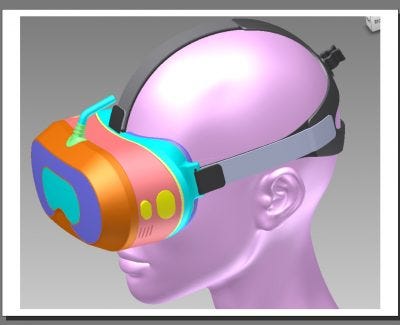
To achieve these goals, we used mass-produced 2160x1200 90 Hz OLED screens, high-quality dual-element optics with individual focusing mechanism, accurate 9-axis orientation tracker and incorporated them into a novel, patent-pending design. Below are some of the highlights of this design. To illustrate them, we mostly use the CAD drawings because they make it easy to show internal parts.
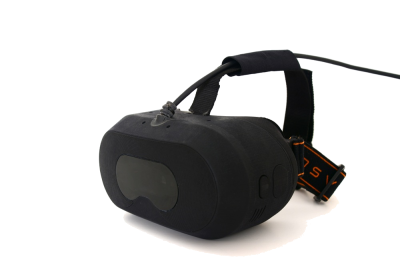
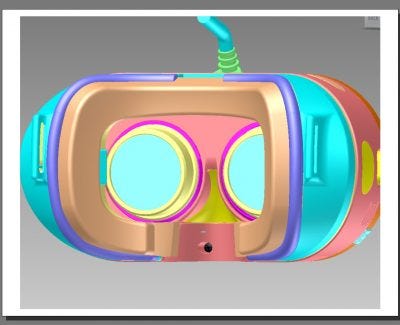
Here is CAD model of the entire unit (each part is colored differently in this model to make them stand out) next to the actual unit:
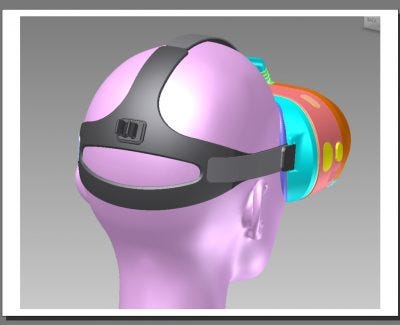
The back side of the unit has a cable clip to allow easy insertion and removal of cables as required. This ensures that cables don’t get in the way of the user.
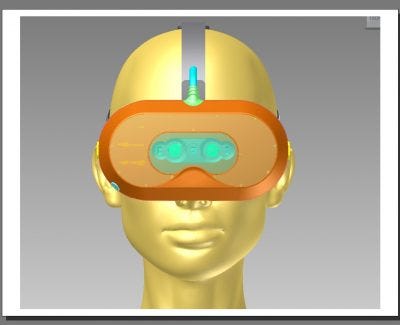
The front of the unit includes a window that is transparent to IR. This allows inclusion of a Leap Motion camera inside the unit to facilitate natural interaction with the hands. The fact that the controller is embedded inside the goggle eliminates the need to route cables externally. This approach is superior to external mounting of the controller because when mounted externally, the controller might be easier to detach from the goggles. Note that in the CAD model, the IR window has been removed so that the Leap Motion unit is clearly visible.
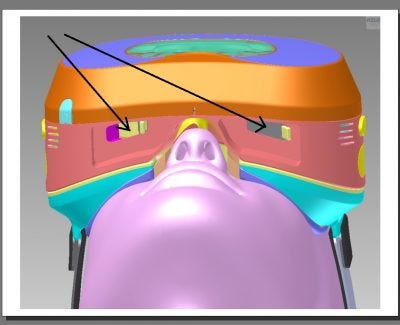
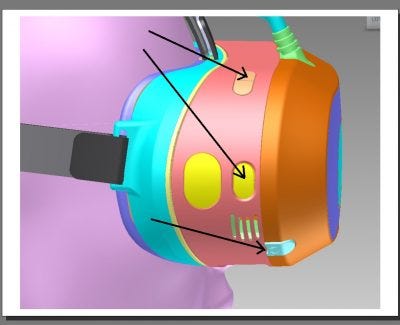
To fit a wide range of users, the goggles were designed with adjustable optics. These allow people that normally wear eyeglasses to take them off and still see an excellent picture. Individual knobs — highlighted by the arrows in the CAD drawing from a bottom view perspective
- allow focusing of each eye independently. It is also possible to design optics that have a large enough eye relief to accommodate glasses but we chose adjustments in this particular design.
The face mask — the part that touches the user’s face — is easily removable and replaceable. It is designed with a groove (not shown in the picture) that allows an operator to quickly and accurately replace the mask when needed without requiring any special tools.
VR experiences can be very intense. For instance, guests to SEGA Joypolis run around in a special warehouse and shoot zombies. It is important to keep these guests cool and dry. That’s why we the public VR goggles include dual silent fans that whisk away humidity and heat.
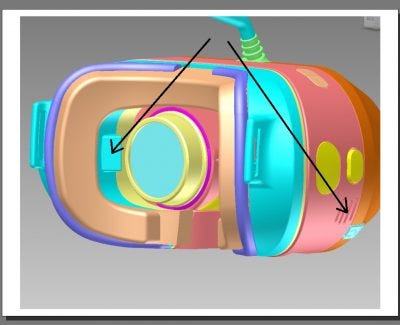
The diagram has arrows pointing to an air vent (one in each side) and the holes through which it exits the goggles. An important feature in the Sensics design is the ability to separate the “passive part” of the goggles (facemask and head strap) from the “active part” (electronics, optics, etc.). This feature provides several important benefits:
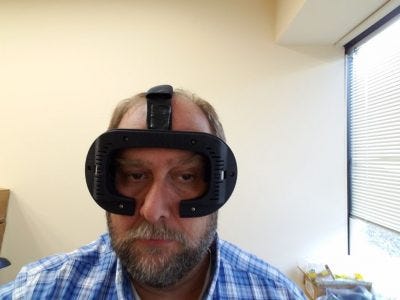
  1. It allows guests to don the passive part while waiting in line. They can adjust the fit to their heads, and make sure the strap is comfortable. While doing so, the front part of the passive unit is completely open so guests can still see the real world, take a selfie with the strap. Only when the activity is about to begin does the operator attach the active part to the passive part.
  2. It permits various cleaning strategies for the passive part — the part that touches the head. For instance, an attraction operator can have many more passive parts than active parts and then clean the passive parts in batch at the end of the day.
  3. Separating the face mask from the active part of the goggles allows for multiple sizes of the face mask to fit kids, different facial structures and so forth.
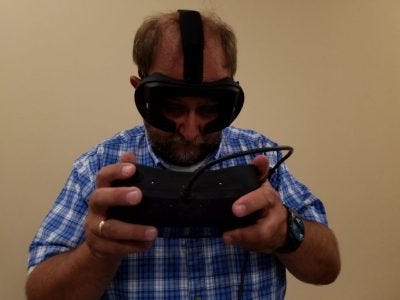
The two parts of the goggles — active and passive — are illustrated in the photos below by Sensics team member Yaron Kaufman.
Detaching the passive part from the active part is done by pressing two button — one in each side of the goggles. The button is shown as yellow highlighted by the arrow in the diagram. The clasp holding the two parts together is made of metal, and thus designed for numerous grab/release cycles.

Two additional parts are highlighted in the diagram: configurable buttons on the top right side of the goggles serve as programmable user-interface controls. This could be to increase/decrease volume, to pause the game, select a menu item or any other function. The mechanical design allows for one, two or three buttons per the preferences of the customer.
Last, an audio output jack appear on the bottom. The goggles can also support a permanent audio solution which attaches where the large yellow ellipse is shown in the diagram to the right. We put a lot of thought into designing this product. We hope you will get a chance to try it and appreciate its suitability to public VR applications.

Tuesday, August 9, 2016

Why did Sensics launch the OSVR Store?


Last week, the OSVR Store came on-line. It offers a range of OSVR-related products, services, accessories and components. It also contains useful information, most of it adopted from this blog.

But why did the Sensics team launch it?

The first answer that comes to mind is “to make money”. That’s an obvious reason, as Sensics is a for-profit company. We invest a lot in developing OSVR and would love to see returns on our investments.

But that’s not the only reason, nor perhaps the most important one. Here are some others.

We wanted the OSVR Store to be helpful to the VR enthusiast and hacker. That’s why we offer components: optics, tracking boards from various vendors, IR camera. More components are coming. Some will use those to upgrade an existing system, others to build a new one.

We wanted a place for hardware developers, a platform to market their innovations. If you make something OSVR-related, we invite you to sell it on the OSVR Store. It can be an OSVR-supported HMD. It can be an accessory or component that can help OSVR users. It can even be OSVR-related services. We strive to offer fair and simple terms. If you can build it, we can help you promote it. Drop us a note at hello@osvrstore.com to get started.

To me, OSVR has always been about choice. About democratizing VR. Not forcing users to buy everything from the same vendor. Encouraging applications to run on many devices. Support more than one operating system.

The OSVR Store is one more way to give everyone choice. Check it out.

Monday, August 1, 2016

OSVR - a Look Ahead

Introduction

OSVR is an open source software platform and VR goggle. Sensics and Razer launched OSVR 18 months ago with the intent of democratizing VR. We wanted to provide an open alternative to walled-garden, single-device approaches.

It turns out that others share this vision. We saw exponential growth in participation in OSVR. Acer, NVIDIA, Valve, Ubisoft, Leap Motion and many others joined the ecosystem. The OSVR goggle – called the Hacker Development Kit – has seen several major hardware improvements. The founding team and many other contributors expanded the functionality of the OSVR software.

I’d like to describe how I hope to see OSVR develop given past and present industry trends.

Increased Device Diversity leads to more Choices for Customers

Trends

An avalanche of new virtual reality devices arrived. We see goggles, motion trackers, haptics, eye trackers, motion chairs and body suits. There is no slowdown in sight: many new devices will launch in the coming months. What is common to all these devices? They need software: game engine plugins, compatible content and software utilities. For device manufacturers, this software is not a core competency but ‘a necessary evil’. Without software, these new devices are almost useless.

At the same time, content providers realize it’s best not to limit the their content to one device. The VR market is too small for that. The more devices you support, the largest your addressable market becomes.

With such rapid innovation, what was the best VR system six months ago is anything but that today. The dream VR system might be a goggle from one vendor, input devices from another and tracking from a third. Wait another six months and you’ll want something else. Does everything need to come from the same vendor? Maybe not. The lessons of home electronics apply to VR: you don’t need a single vendor to make all your devices.

This ‘mix and match’ ability is even more critical for enterprise customers. VR arcades, for instance, might use custom hardware or professional tracking systems. They want a software environment that is flexible and extensible. They want an environment that supports ‘off-the-shelf’ products yet extends for ‘custom’ designs.

OSVR Implications

OSVR already supports hundreds devices. The up-to-date list is here: http://osvr.github.io/compatibility/ . Every month, device vendors, VR enthusiasts and the core OSVR team add new devices. Most OSVR plugins (extension modules) are open-sourced. Thus, it is often possible to use an existing plugin as baseline for a new one. With every new device, we come closer towards achieving universal device support.

A key OSVR goal is to create abstract device interfaces. This allows applications to work without regards to the particular device or technology choice. For example, head tracking can come from optical trackers or inertial ones. The option of a a “mix and match” approach overcomes the risk of a single vendor lock-in. You don’t change your word processor when you buy a new printer. Likewise, you shouldn’t have to change your applications when you get a new VR device.

We try to make it easy to add OSVR support to any device. We worked with several goggle manufactures to create plugins for their products. Others did this work themselves. Once such a plugin is ready, customers instantly gains access to all OSVR content. Many game engines – such as Unity, Unreal and SteamVR- immediately support it.

The same is also true for input and output peripherals such as eye trackers and haptic devices. If developers use an API from one peripheral vendor, they need to learn a new API for each new device. If developers use the OSVR API, they don’t need to bother with vendor-specific interfaces.

I would love to see more enhancements to the abstract OSVR interfaces. They should reflect new capabilities, support new devices and integrate smart plugins.


More People Exposed to more VR Applications in More Places

Trends

Just a few years ago, the biggest VR-centric conference of the year had 500 attendees. Most attendees had advanced computer science degrees. My company was one of about 10 presenting vendors. Today, you can experience a VR demo at a Best Buy. You can use a VR device on a roller coaster. With a $10 investment, you can turn your phone into a simple VR device.

In the past, to set up a VR system you had to be a geek with plenty of time. Now, ordinary people expect to do it with ease.

More than ever, businesses are experimenting with adopting VR. Applications that have always been the subject of dreams of are becoming practical. We see entertainment, therapy, home improvement, tourism, meditation, design and many other applications.

These businesses are discovering that different applications have different hardware and software requirements. A treadmill at home is not going to survive the intensive use at a gym. Likewise, a VR device designed for home use is not suitable for use in a high-traffic shopping mall. The computing and packaging requirements for these applications are different from use to use. Some accept a high-end gaming PC, while others prefer inexpensive Android machines. I expect to see the full gamut of hardware platforms and a wide variety of cost and packaging options.

OSVR Implications

“Any customer can have a car painted any color that he wants so long as it is black”, said Henry Ford. I’d like to see a different approach, one that encourages variety and customization.

On the hardware side, Sensics is designing many products that use OSVR components. For instance, our “Goggles for public VR” use OSVR parts in an amusement park goggle. We also help other companies use OSVR components inside their own packages. For those that want to design their own hardware, the OSVR goggle is a good reference design.

On the software side, I would like to see OSVR expand to support more platforms. I’d like to see better Mac support and more complete coverage of Android and Linux platforms. I’d like to see VR work well on mid-range PCs and not limited to the newest graphics cards. This will lower the barriers to experience good VR and bring more people into the fold. I’d like to see device-specific optimizations to make the most of available capabilities. The OpenCV image processing library has optimizations for many processors. OSVR could follow a similar path.

Additionally, it is important to automate or at least simplify the end-user experience. Make it as close to plug-and-play as possible . The task of identifying available devices and configuring them should be quick and simple.

Simplicity is not limited to configuration. We’d like to see easier ways to choose, buy and deploy software.

Reducing Latency is Becoming Complex

Trends

Presence in VR requires low latency, and reducing latency is not easy. Low latency is also not the result of one single technique. Instead, many methods work together to achieve the desired result. Asynchronous time warp modifies the image just before sending it to the display. Predictive tracking lowers perceived latency by estimating future orientation. Direct mode bypasses the operating system. Foveated rendering reduces render complexity by understanding eye position. Render masking removes pixels from hidden areas in the image.

If this sounds complex, it is just the beginning. One needs to measure optical distortion and correct it in real-time. Frame rates continue to increase, thus lowering the available time to render a frame. Engines can optimize rendering by using similarities between the left- and right-eye images. Techniques that used to be exotic are now becoming mainstream.

A handful of companies have the money and people to master all these techniques. Most other organizations prefer to focus on their core competencies. What should they do?

OSVR implications

A key goal of OSVR is to “make hard things easy without making easy things hard”. The OSVR Render Manager examplifies this. OSVR makes these latency-reduction methods available to everyone. We work with graphics vendors to achieve direct mode through their API. We work with game engines to provide native integration of OSVR into their code.

I expect the OSVR community to continue to keep track of the state of the art, and improve the code-base. Developers using OSVR can focus away from the plumbing of rendering. OSVR will continue to allow developers to focus on great experiences.


The Peripherals are Coming

Trends

A PC is useful with a mouse and keyboard. Likewise, A goggle is useful with a head tracker. A PC is better when adding a printer, a high-quality microphone and a scanner. A goggle is better with an eye tracker, a hand controller and a haptic device. VR peripherals increase immersion and bring more senses into play.

In a PC environment, there are many ways to achieve the same task. You select an option using the mouse, the keyboard, by touching the screen, or even with your voice. In VR, you can do this with a hand gesture, with a head nod or by pressing a button. Applications want to focus on what you want to do rather than how you express your wishes.

More peripherals mean more configurations. If you are in a car racing experience, you’d love to use a rumble chair if you have it. Even though Rumble chairs are not commonplace, there are several types of them. Applications need to be able to sense what peripherals are available and make use of them.

Even a fundamental capability like tracking will have many variants. Maybe you have a wireless goggle that allows you to roam around. Maybe you sit in front of a desk with limited space. Maybe you have room to reach forward with your hands. Maybe you are on a train and can’t do so. Applications can’t assume just one configuration.

OSVR implications

OSVR embeds Virtual Reality Peripheral Network (VRPN), an established open-source library. Supporting many devices and focusing on the what, not the how is in our DNA.

I expect OSVR to continue to improve its support for new devices. We might need to enhance the generic eye tracker interface as eye trackers become more common. We will need to look for common characteristics of haptics devices. We might even be able to standardize how vendors specify optical distortion.

This is a community effort, not handed down from some elder council in an imperial palace. I would love to see working groups formed to address areas of common interest.

Turning Data into Information

Trends

A stream of XYZ hand coordinates is useful. Knowing that this stream represents a ‘figure 8’ is more useful. Smart software can turn data into higher-level information. Augmented reality tools detect objects in video feeds. Eye tracking software converts eye images into gaze direction. Hand tracking software converts hand position into gestures.

Analyzing real-time data gets us closer to understanding emotion and intent. In turn, applications that make use if this information can become more compelling. A game can use gaze direction to improve the quality of interaction with a virtual character. Monitoring body vitals can help achieve the desire level of relaxation or excitement.

As users experience this enhanced interaction, they will demand more of it.

OSVR Implications

Desktop applications don’t have code to detect a mouse double-click. They rely on the operating system to convert mouse data into the double-click event. OSVR needs to provide applications with both low-level data and high-level information.

In “OSVR speak”, an analysis plugin is the software that converts data into information. While early OSVR work focused on lower-level tasks, several analysis plugins are already available. For example, DAQRI integrated a plugin that detects objects in a video stream.

I expect many more plugins will become available. The open OSVR architecture opens plugin development to everyone. If you are an eye tracking expert, you can add an eye tracking plugin. If you have code that detects gestures, it is easy to connect it to OSVR. One might also expect a plugin marketplace, like an asset store, to help find and deploy plugins.

Augmenting Reality

Market trends

Most existing consumer-level devices are virtual reality devices. Google Glass has not been as successful as hoped. Magic Leap is not commercial yet. Microsoft Hololens kits are shipping to developers, but are not priced for consumers yet.

With time, augmented-reality headsets will become consumer products. AR products share many of the needs of their VR cousins. They need abstract interfaces. They need to turn data into information. They need high-performance rendering and flexible sensing.

OSVR Implications

The OSVR architecture supports AR just as it supports VR. Because AR and VR have so much in common, many components are already in place.

AR devices are less likely to tether to a Windows PC. The multi-platform and multi-OS capabilities of OSVR will be an advantage. Wherever possible, I hope to continue and see a consistent cross-platform API for OSVR. This will allow developers to tailor deployment options to the customer needs.

Summary


We designed OSVR to provide universal connectivity between engines and devices. OSVR makes hard things easy so developers can focus on fantastic experiences, not plumbing. It is open so that the rate of innovation is not constrained by a single company. I expect it to be invaluable for many years to come. Please join the OSVR team and myself for this exciting journey.

To learn more about our work in OSVR, please visit this page


This post was written by Yuval Boger, CEO of Sensics and co-founder of OSVR. Yuval and his team designed the OSVR software platform and built key parts of the OSVR offering.

Thursday, July 21, 2016

Key Parameters for Optical Designs

At Sensics, we completed many optical designs for VR over the years, and are busy these days with new ones to accommodate new displays and new sets of requirements. For those thinking about optics, here is a collection of some important parameters to consider, when focusing in optical systems for VR.

Field of View: typically measured in degrees, the field of view defines what is the horizontal, vertical and diagonal extent that can be viewed at any given point. This is often specified as a monocular (single eye) field of view, but it is also customary to specify the binocular field of view and thus the binocular overlap

Eye relief: typically measured in millimeters, the eye relief indicates the distance between the eye and the closest optical element as seen in the illustration below. 

Eye Relief
Illustration of eye relief

Regular eyeglasses have an eye relief of about 12mm. Advantages of larger eye relief:
  • If the optics are too close to the eye, they generate discomfort such as when the eyelashes touch the optics.
  • If the eye relief is large enough, the system might be able to accommodate people wearing glasses without the need to provide a focusing mechanism to compensate for not having glasses
Disadvantages of larger eye relief:
  • The total depth of the optical system (distance from eye to screen) becomes larger and the overall system potentially more cumbersome.
  • The minimal diameter first optical element is dictated by a combination of the desired field of view and eye relief. Larger eye relief requires the lens to be wider and thus likely heavier.
Eye box: often specified in millimeters, the eye box determines how much the eye can move up/down/left/right from the optimal position without significant degradation in the image quality. Some optical systems such as rifle scopes have very narrow eye box because they want to 'force' the eye to be in the optimal position. Other optical systems, such as HMDs used in soldier training, might desire larger eye boxes to allow the trainee to see a good image even as the HMD moves on the head while the trainee is running. The image quality at the optimal position is most always best, but if the eye box is too narrow, the user will not obtain a good image without tedious adjustments. For instance, the diagram below shows the simulation results of an optical design at the nominal eye position (left) and at 4 mm away from the optimal position:
Eye box simulation
Comparing optical quality at a distance away from the optimal eye position

Material and type of lensa lens is typically made from optical-grade plastic or from glass. There are hundreds of different optical-grade glass types but only about a dozen optical-grade plastic material. Different material provide different light bending properties (e.g. index of refraction) so it is quite common that multi-element optical systems are made with more than one material. Glass is typically heavier, more expensive to mold, but has greater variety, provides better surface quality and is often physically harder (e.g. more resistant to scratches). Plastic is cheaper and lighter. Additional lens types and non-linear optical elements such as Fresnel Lenses and polarizers are also available.

Distortion: optical distortion is one type of imperfection in an optical design. Distortion causes straight lines not being seen as straight lines when viewed through the optics. An example of this is shown below.

Optical distortion
Optical distortion
Distortion is reported in percentage units. If a pixel is placed at a distance of 100 pixels (or mm or degrees or inches or whichever unit you prefer) and appears as if it at a distance of 110, the distortion at that particular point is (110-100)/100 = 10%. During the process of optical design, distortion graphs are commonly viewed during the iterations of the design. For instance, consider the distortion graph below for a design with 96 degrees field of view (2 x 48): 

Sample Distortion Curve
Distortion graph

The graph shows, for instance, that at 30 degrees away from the center, distortion is still about 2-3%, but at 40 degrees away from the center it increases to about 8 percent. The effect of distortion is sometimes shown in a distortion grid shown below. If the optical design was perfect and had no distortion, each blue cross would line up perfectly at the grid intersection points. 

Distortion Grid
Distortion Grid
Sometimes, distortion is monotonic, meaning that it gradually increases as one moves towards the edge. Non-monotonic distortion can cause the appearance of a 'bubble' if not corrected. 

Chromatic aberration: Just like white light breaks into various colors when passing through a prism, an optical system might behave differently for different wavelengths/colors. This could cause color breakup. It is useful to explore how much the system is 'color corrected' so as to minimize this color breakup. The image below shows a nice picture at the center of the optical system but fairly significant color breakup at the edges. 

Color breakup
Color breakup
Relative illuminationthe ability of an optical system to collect light can change throughout the image. Consider a uniformly-lit surface that is viewed through an optical system. Often, the perceived brightness at the center of the optics is the highest and it drops is one moves towards the edges. This is numerically expressed as relative illumination such as the graph below. While the human eye has amazing dynamic range, non-monotonic illumination can cause the appearance of dark or bright 'rings' in the image. 


Relative Illumination

Spot size: imagine a screen with a pattern of tiny dots. In a perfect world, all dots would appear with the same size and no smear when looking through the optical system. In reality, the dot size typically increases as one moves away from the center. The numerical measurement of this is the spot size and diagrams indicating the spot size at different points through the optics often look something like this:

Spot size
Spot Size
Other characteristics: depending on the desired use case, there are often size, weight and cost limitations that need to be considered to narrow the range of acceptable solutions to the specifications. Just like it is easier to fit a higher-degree polynomial to a set of data points because more terms provide additional degrees of freedom, it is easier to achieve the a set of desired optical parameters with additional lenses (or more precisely with additional surfaces), but extra lenses often add cost, size and weight. 

Putting it all together: it is practically impossible to find a car that is inexpensive, has amazing fuel efficiency, offers fantastic acceleration, seats 7 people and is very pleasing to the eye. Similarly, it is difficult to design an optical system that has no distortion, provides wide field of view, large eye box, costs next to nothing and is very thin. When contracting the design of an optical system, it is useful to define all desired characteristics but specify which parameters are key and which parameters are less important.

Wednesday, June 22, 2016

The Three (and a half) Configurations of Eye Trackers

Eye tracking could become a critical sensor in HMDs. In previous posts such as here, here and here we discussed some of the ways that eye trackers could be useful as input devices, as ways to reduce rendering load and more. But how are eye trackers installed inside an HMD? An appropriate placement of the eye tracking camera gives a quality image of the eye regardless of the gaze direction. If the eye image is bad, the tracking quality will be bad. It's truly a 'garbage in, garbage out' situation. The three typical ways to install a camera are:
  1. Underneath the optics
  2. Combined with the optics via a hot mirror (or an internal reflection)
  3. Inside the optics.
In this post, we describe these configurations.

Underneath the optics

Eye tracking This configuration is illustrated in the image on the right, which shows the Sensics zSight HMD with an integrated Ergoneers eye tracker. The tracker is the small camera that is visible underneath the left eyepiece. The angle in which the camera is installed is important. A camera that is perpendicular - practically looking into the eye - will typically get an excellent image.  If the camera angle is steep, the anatomy of the eye - eyelids, eyelashes, inset eyes - gets in the way of getting a good image. If the eye relief (distance from cornea to first element of the optics) is small, the camera will need to be placed at a steeper angle than if the eye relief was large. If the diameter of the optics are large, the camera would need to be placed lower and thus at a steeper angle than if the diameter of the optics is smaller. If the user wears glasses, an eye tracker that is placed underneath the optics might "see" the frame of the glasses instead of the eye. Having said that, the advantage of this approach is that it does not place many constraints on the optics. Eye tracker cameras could usually be added below optics that were not designed to accommodate eye tracking.

Eye tracker that is combined with the optics

HotMirrorWithRaysEye tracking cameras are often infra-red cameras that look at IR light that is reflected off the eye. As such, eye tracking cameras don't need visible light. This allows using what is called a hot mirror: a mirror that reflects IR light yet passes visible light. Consider the optical system shown to the right (copyright Sensics). Light from the screen (right side) passes through a lens, a hot mirror and another lens and reaches the eye. In contrast, if the eye is lit by an IR light source, IR light coming back from the eye is reflected off the hot mirror towards the upper part of the optical system. If a camera is placed there, it can have an excellent view of the eye without interfering with the optical quality. This configuration also gives more flexibility with regards to the camera being used. For instance, a larger camera (perhaps with very high frame rate) would not be feasible if placed under the optics. However, when placed separately from the optical system such as above the mirror, it might fit. The downside of this configuration, other than the need to add the hot mirror, is that the optical system needs to leave enough room for the hot mirror and this introduces a mechanical constraint that limits the options of the optical designer. ReflectionWithRaysA variation on this design (what I referred in the title as "the half" configuration is having the IR light reflect off one of the optical surfaces, assuming this surface is coated with an IR-reflective coating.  You can see this in the configuration on the right (also copyright Sensics). An optical element is curved and the IR light reflects off it into the camera. The image received by the camera might be somewhat distorted, but since that image is processed by an algorithm, that algorithm could compensate for the image distortion. This solution removes the need for a hot mirror but does require that there is a lens that is shaped in a way to reflect the IR light into the camera. It also requires the additional expense of an IR coating.

Eye tracker integrated with the optics

dSight with Ergoneers eye trackerThe third configuration is even simpler. A miniature camera is used. A small hole is drilled through the optics and the camera is placed through it. The angle and location of the camera is balanced between getting an optical image of the eye and the need to not introduce a significant visual distraction. This is shown on the right as part of the eye tracking option of the Sensics dSight. This configuration gives excellent flexibility with regards to camera placement, but does introduce some visual distraction and requires careful drilling of a hole through the optics.